
2015-12-07
HostUS CentOS pptp vpn安装记录
最重要的,HostUS的服务器默认pptp是没有打开的,需要去设置里打开才行。

Step 1 – PPTP Installation
You will have to select one server to be responsible for handling out IPs to others and authenticating all of your servers into your VPN. This will become your PPTP Server.
On CentOS 6 x64:
rpm -i http://poptop.sourceforge.net/yum/stable/rhel6/pptp-release-current.noarch.rpm
yum -y install pptpd
Now you should edit /etc/pptpd.conf and add the following lines:
localip 10.0.0.1
remoteip 10.0.0.100-200
Where localip is IP address of your server and remoteip are IPs that will be assigned to clients that connect to it.
Next, you should setup authentication for PPTP by adding users and passwords.
Simply add them to /etc/ppp/chap-secrets :
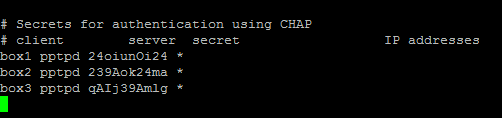
Where client is the username, server is type of service – pptpd for our example, secret is the password, and IP addresses specifies which IP address may authenticate. By setting ‘*’ in IP addresses field, you specify that you would accept username/password pair for any IP.
Step 2 – Add DNS servers to /etc/ppp/pptpd-options
ms-dns 8.8.8.8
ms-dns 8.8.4.4
Now you can start PPTP daemon:
service pptpd restart
Verify that it is running and accepting connections:

Step 3 – Setup Forwarding
It is important to enable IP forwarding on your PPTP server. This will allow you to forward packets between public IP and private IPs that you setup with PPTP. Simply edit /etc/sysctl.conf and add the following line if it doesn’t exist there already:
net.ipv4.ip_forward = 1
To make changes active, run sysctl -p
Step 4 – Create a NAT rule for iptables
网络上带MASQUERADE在openVZ的虚拟机下都是无法使用的。因为(据说)真正的原因是因为“openvz 没有把 MASQ 模块虚拟化”,实际使用的语句如下:
iptables -t nat -A POSTROUTING -s 192.168.0.0/24 -o venet0 -j SNAT --to YourIP
注意,你可能需要根据你的情况替换上面的“192.168.0.0”、“eth0”、“venet0”和“YourIP”。
使用下面的命令查看是否设置成功:
# iptables -L -t nat这样基本结算结束了。
参考文章链接:
https://www.digitalocean.com/community/tutorials/how-to-setup-your-own-vpn-with-pptp
http://solicomo.com/linux/vpn-iptables.html
https://qiaodahai.com/buyvm-openvz-vps-debian-pptp-vpn.html
http://www.ti6.net/wangzhanjishu/1529.html
http://www.itc8.com/detail/2015/1204/6339.html
 标签:
标签:
转载注明:转自Mao
